
Label Generation
Print product labels, shelf-edge labels and barcode labels directly from your inventory — with allergen info, pricing and branding included.
- Product & shelf labels
- Barcode printing
- Allergen info
- Custom templates
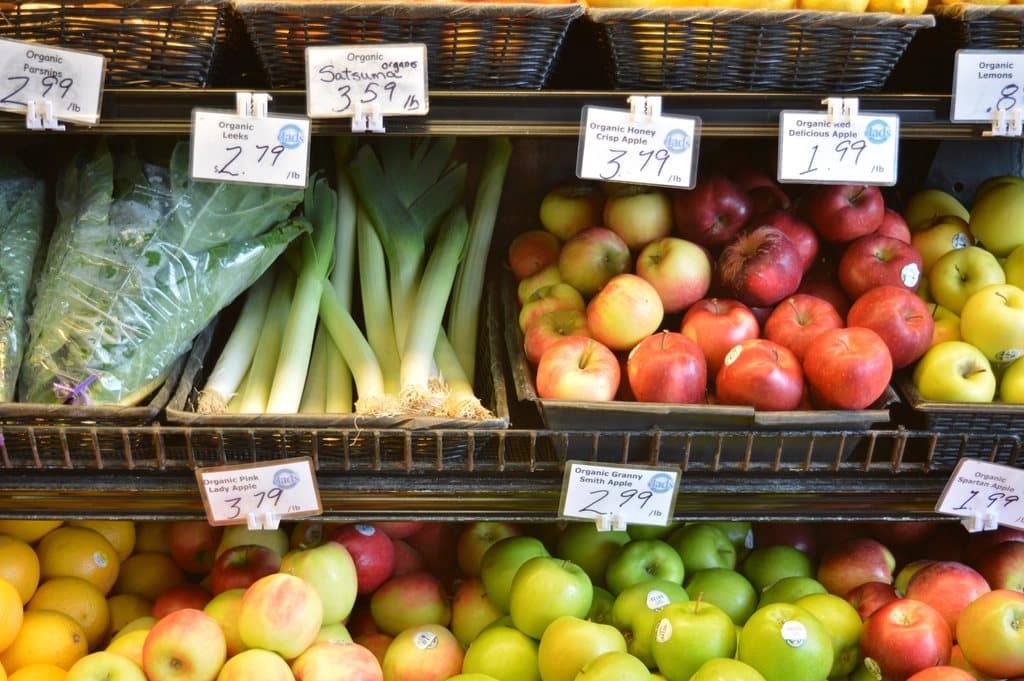
Labels straight from your product list
Pick the products, choose a template and print: shelf-edge labels with the current price, barcode labels for stock, and product labels with allergen information. A price change in the back office is a reprint, not a redesign.
- Shelf-edge, barcode and product labels
- Templates in your brand
- Batch printing
- Prices taken from inventory
What's included
Everything you need from this part of the platform — working alongside the rest of your setup.
Product labels
Print branded labels with name, price and allergens.
Barcode labels
Generate and print barcodes for any product.
Shelf-edge labels
Print shelf-edge pricing labels in bulk.
Custom templates
Design label templates with your logo and layout.
Batch printing
Print labels for a category or supplier in one go.
Label sizes
Support for all common label printer sizes.
Benefits for your business
Professional look
Branded labels with allergen info build customer trust.
Save time
Batch-print labels for new stock in minutes, not hours.
Accurate pricing
Shelf-edge labels always match the till — no surprises.
- From inventory
- Auto
- From inventory
- Printing
- Batch
- Printing
- Label sizes
- All
- Label sizes
- Info included
- Allergen
- Info included
Where you will use it
New stock
Print barcode labels as goods arrive.
Price change
Reprint shelf-edge labels for the items that changed.
Fresh food
Print product labels with allergen information.
Up and running in days, not months
- 1
Design your template
Create a label template with your logo, fonts and layout.
- 2
Select products
Choose items individually or by category for batch printing.
- 3
Print & apply
Send to your label printer and apply to products or shelves.
Label Generation works with the rest of Qposd
One set of products, customers and prices is shared by every part of the system, so what you do here shows up everywhere else without typing it twice.
- Inventory Management
- EPOS for Retail
- Hardware
Label Generation: common questions
Which label sizes are supported?
Several label sizes are supported, with templates you can adjust. Ask us about your printer.
Can labels show allergens?
Yes. Product labels can include allergen information held against the item.
Can I print many labels at once?
Yes. Batch printing prints labels for a selection of products in one go.
Works well with
Ready to explore Label Generation?
Book a free demo and see it in action for your business.